Homelab as Production/Part 2 of 16
Provisioning Hardware with Terraform and an AI That Made Mistakes
The bpg/proxmox provider, cloud-init, PostgreSQL HA — and the SSH username bug
Before I had a working GitOps pipeline, before Flux was reconciling manifests, before a single Kubernetes pod had started, I had five bare-metal mini PCs sitting on a shelf and a blank main.tf. The question was: how do you go from physical hardware to a reproducible, version-controlled, idempotent infrastructure without spending a week reading provider documentation and debugging YAML indentation?
The answer, it turns out, involves writing a lot of Terraform with an AI co-pilot that is genuinely useful most of the time and occasionally confidently wrong in ways you only discover when you run terraform apply.
This post covers the first major act of this project: provisioning the entire Proxmox cluster topology, 8 K3s VMs, 2 PostgreSQL HA VMs, 2 1Password Connect LXCs, with Terraform. It’s also the story of the SSH username bug that taught me to build a gotchas registry.
As nerdy as it sounds, I had originally purchased these mini-PCs to play EverQuest (True-Boxing, where every character needs its own hardware). I used my desktop as the primary, an old MacBook Pro, and four mini-PCs, with used Stream Decks from Elgato handling macros for each character. After that phase ended, I installed VMware Workstation, ran a few VMs, got something working with K3s, and got bored again.
The Hardware Decision
The cluster is five nodes in total. Three are compact x86 mini PCs with 16 cores and 32GB RAM each, good for running Proxmox control plane and K3s server nodes. One is a beefier unit with a dedicated GPU and 32GB RAM, allocated to agent-only workloads. The fifth is an older gaming tower repurposed as a high-memory agent (12 cores, 67GB RAM) plus a standby PostgreSQL node.
node-01 — 16c / 32 GB — 2.5 GbE — agent + PG primary + 1Password Connect
node-02 — 12c / 32 GB — 2.5 GbE — k3s-server-1 + k3s-agent-1
node-03 — 16c / 32 GB — 2.5 GbE — k3s-server-2 + k3s-agent-2
node-04 — 16c / 32 GB — 2.5 GbE — k3s-server-3 + k3s-agent-3
node-05 — 12c / 67 GB — 1 GbE — k3s-agent-5 + PG standby + 1Password Connect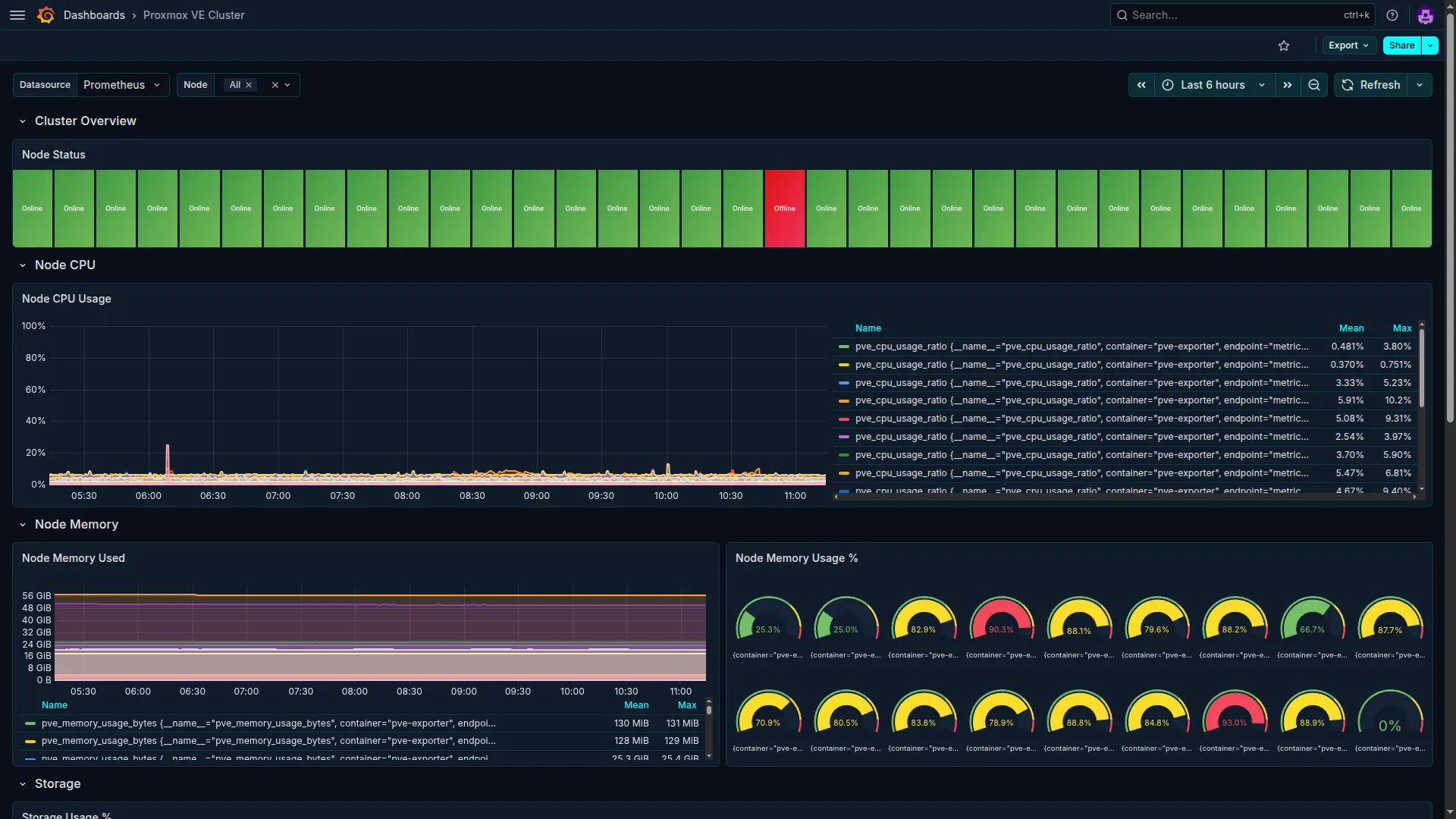 The Proxmox VE cluster as seen from Grafana. Five nodes, all green, monitored via the Proxmox VE exporter. This is what Terraform provisions and what the observability stack watches.
Why Proxmox over alternatives like VMware ESXi, Nutanix CE, or running K3s directly on bare metal? A few reasons:
- Existing hardware. These machines were already running Proxmox. Replacing the hypervisor would have meant a week of re-imaging, not infrastructure work.
- Mature KVM + LXC support. Proxmox handles both full VMs (for K3s nodes) and lightweight containers (for 1Password Connect). Not every workload needs a full kernel.
- bpg/proxmox Terraform provider. A well-maintained community provider that gives you complete life-cycle management of VMs, LXCs, cloud-config snippets, and network objects, all from HCL.
- The Proxmox web UI is genuinely good for debugging. When Terraform creates a VM and something goes wrong, you can open the VM’s console directly in the browser.
Running K3s directly on bare metal was tempting for simplicity, but VMs give you a crucial property: you can snapshot before risky operations and destroy or recreate nodes cleanly. The VM boundary also enforces the separation of concerns between hypervisor and cluster that makes the GitOps model work cleanly.
Eventually, when time allowed, I decided to deploy a bare-metal hypervisor, Proxmox, to do it properly. Time kept getting away from me; home projects are always the first thing to fall off. Context switching for humans can be as expensive as it is for CPU instructions. I played around with Terraform to see if I could make it easier to pick up and put down, but I could never find the sustained energy to actually implement the ideas I’d been sketching out.
The Cluster Topology
The full VM distribution across Proxmox nodes looks like this:
graph LR
    subgraph node02["node-02 · 12c / 31 GB"]
        S1VM["k3s-server-1<br/>4c · 4 GB"]
        A1VM["k3s-agent-1<br/>6c · 26 GB"]
        T9000["VM 9000<br/>(Ubuntu template)<br/>2c · 2 GB"]
    end
    subgraph node03["node-03 · 16c / 31 GB"]
        S2VM["k3s-server-2<br/>4c · 4 GB"]
        A2VM["k3s-agent-2<br/>10c · 24 GB"]
    end
    subgraph node04["node-04 · 16c / 31 GB"]
        S3VM["k3s-server-3<br/>4c · 4 GB"]
        A3VM["k3s-agent-3<br/>8c · 24 GB"]
    end
    subgraph node01["node-01 · 16c / 32 GB"]
        A4VM["k3s-agent-4<br/>12c · 24 GB"]
        PGPRIM["pg-primary (VM 520)<br/>2c · 4 GB"]
        OP1["1password-connect (CT 200)<br/>2c · 2 GB"]
    end
    subgraph node05["node-05 · 12c / 67 GB"]
        A5VM["k3s-agent-5<br/>10c · 60 GB"]
        PGSTBY["pg-standby (VM 521)<br/>2c · 4 GB"]
        OP2["1password-connect (CT 201)<br/>2c · 2 GB"]
    end

    style node02 fill:#eff6ff,stroke:#93c5fd
    style node03 fill:#eff6ff,stroke:#93c5fd
    style node04 fill:#eff6ff,stroke:#93c5fd
    style node01 fill:#f0fdf4,stroke:#86efac
    style node05 fill:#f0fdf4,stroke:#86efac
    style S1VM fill:#2563eb,color:#fff
    style S2VM fill:#2563eb,color:#fff
    style S3VM fill:#2563eb,color:#fff
    style A1VM fill:#16a34a,color:#fff
    style A2VM fill:#16a34a,color:#fff
    style A3VM fill:#16a34a,color:#fff
    style A4VM fill:#16a34a,color:#fff
    style A5VM fill:#16a34a,color:#fff
    style PGPRIM fill:#d97706,color:#fff
    style PGSTBY fill:#d97706,color:#fff
    style OP1 fill:#7c3aed,color:#fff
    style OP2 fill:#7c3aed,color:#fff
Note the deliberate placement: the two PostgreSQL VMs are spread across node-01 and node-05, the two non-server Proxmox nodes, so a single Proxmox node failure does not take down both the database primary and standby simultaneously. The 1Password Connect LXCs follow the same anti-affinity pattern.
Terraform with the bpg/proxmox Provider
The bpg/proxmox provider is the key that makes all of this possible. The official Proxmox Terraform provider exists but has been historically incomplete. The community bpg/proxmox provider is more comprehensive and actively maintained.
The provider block requires two distinct authentication mechanisms: API authentication (for most operations) and SSH authentication (for operations that Proxmox’s API can’t do, like uploading cloud-config snippets to storage). This distinction matters and is where the first gotcha lives.
Pin your provider version. Provider APIs change. The difference between v0.94.0 and v0.95.0 can include breaking changes to resource schemas. Floating on >= 0.90 in production is asking for a bad day.
terraform {
  required_providers {
    proxmox = {
      source  = "bpg/proxmox"
      version = "0.95.0"
    }
  }
}

provider "proxmox" {
  endpoint  = data.onepassword_item.pve.url
  api_token = data.onepassword_item.pve.credential

  ssh {
    agent    = true
    username = "root"   # Must be the OS root user, NOT the API token ID
  }
}
The PROXMOX_VE_* environment variable gotcha. The bpg/proxmox provider reads several PROXMOX_VE_* environment variables, PROXMOX_VE_ENDPOINT, PROXMOX_VE_USERNAME, PROXMOX_VE_PASSWORD, and others, and these silently override whatever you set in the provider block. If you have these set in your shell from an older workflow or a different tool, your provider block values are ignored. No warning is emitted. You just get unexpected behavior that is very hard to trace. The rule in this repository: never set PROXMOX_VE_* environment variables. All credentials flow through 1Password data sources.
The Cloud-Init Pattern
Every VM in this cluster is provisioned from a single Ubuntu 24.04 cloud image template (VM 9000 on node-02). Terraform clones that template and attaches a role-specific cloud-init configuration. Here is a simplified version of a K3s server VM resource:
resource "proxmox_virtual_environment_vm" "k3s_servers" {
  for_each = toset(local.server_nodes)

  name      = "homelab-kcs-vm-${each.key}"
  node_name = each.key
  vm_id     = 500 + index(local.server_nodes, each.key)

  clone {
    vm_id        = var.k3s_template_vm_id
    node_name    = var.k3s_template_node_name
    datastore_id = var.virtual_environment_datastore_id
    full         = true
  }

  cpu    { cores = 4 }
  memory { dedicated = 4096 }

  initialization {
    dns {
      servers = ["8.8.8.8", "8.8.4.4"]
    }
    ip_config {
      ipv4 {
        address = "${local.k3s_server_ips[each.key]}/24"
        gateway = local.k3s_network.gateway
      }
    }
    user_data_file_id = proxmox_virtual_environment_file.k3s_server_cloud_config[each.key].id
  }

  lifecycle {
    ignore_changes        = [initialization]
    create_before_destroy = true
  }
}
The lifecycle { ignore_changes = [initialization] } block deserves an explanation. Cloud-init only runs on first boot. The initialization block in the bpg/proxmox provider maps to the cloud-init configuration attached to the VM. If you modify the cloud-init template file later, adding a package, changing a user, Terraform detects a diff in user_data_file_id and wants to update the VM. Without ignore_changes, that update triggers a VM replacement. A running K3s node gets destroyed and recreated from scratch.
The ignore_changes = [initialization] tells Terraform: “track this on create, ignore it on subsequent plans.” Configuration drift after first boot is managed by Ansible and Flux, not by re-running cloud-init.
The user_account / user_data_file_id mutual exclusion. The bpg/proxmox provider has two ways to configure cloud-init users: the user_account block (inline, simple) and user_data_file_id (full cloud-config file, flexible). These are mutually exclusive. Specifying both causes a provider error. The audit that cleaned up the initial module found this was broken in the first draft. Once you move to custom cloud-init files for any reason (installing packages, writing files, running scripts), you’re on user_data_file_id and can’t mix in user_account.
The cloud-init templates themselves follow a consistent pattern. The K3s server template installs packages, adds the SSH public key, configures the K3s systemd service with the datastore endpoint, and starts the agent. The PostgreSQL template does more: it partitions and formats the dedicated data disk, installs PostgreSQL, configures streaming replication, sets up keepalived, and creates the initial databases and users, all on first boot.
PostgreSQL HA: Why Not etcd?
K3s ships with an embedded etcd datastore for HA control plane operation. Using etcd is the path of least resistance. I chose an external PostgreSQL cluster instead, for three reasons:
- I already had PostgreSQL. The cluster needed a database for Keycloak, n8n, Wiki.js, Terraform remote state, and several other applications. Running a separate etcd cluster for K3s would have been a sixth infrastructure concern.
- Operational simplicity. One HA database cluster to monitor, backup, and understand, not two separate HA systems with different tooling.
- K3s has excellent external datastore support. The external PostgreSQL path is well-documented and production-tested.
The PostgreSQL HA cluster uses streaming replication with keepalived for automatic VIP (Virtual IP) failover:
graph TD
    VIP["VIP: 10.0.0.44<br/>keepalived VRRP · virtual_router_id 44"]

    subgraph PRI["node-01 — VM 520 · 10.0.0.45"]
        PRI_KA["keepalived MASTER<br/>priority 100"]
        PRI_PG["PostgreSQL Primary<br/>read/write"]
        PRI_KA --- PRI_PG
    end

    subgraph STB["node-05 — VM 521 · 10.0.0.46"]
        STB_KA["keepalived BACKUP<br/>priority 90"]
        STB_PG["PostgreSQL Standby<br/>hot standby · read-only"]
        STB_KA --- STB_PG
    end

    VIP -->|"normally routes to"| PRI
    VIP -.->|"failover within ~15s"| STB
    PRI_PG -->|"streaming WAL replication<br/>async"| STB_PG
    PRI_KA <-->|"VRRP unicast"| STB_KA

    CLIENTS["Consumers<br/>K3s · Terraform · Apps<br/>(connect to VIP only)"]
    CLIENTS --> VIP

    style VIP fill:#d97706,color:#fff
    style PRI_KA fill:#16a34a,color:#fff
    style PRI_PG fill:#15803d,color:#fff
    style STB_KA fill:#6b7280,color:#fff
    style STB_PG fill:#4b5563,color:#fff
    style CLIENTS fill:#0f172a,color:#fff
Every consumer, K3s servers, Terraform state backend, Keycloak, n8n, Wiki.js, connects to 10.0.0.44 (the VIP), not to the primary’s direct IP. If the primary fails, keepalived detects the PostgreSQL health check failure within about 10 seconds, the standby wins the VRRP election, the VIP migrates, and PostgreSQL is promoted. The consumers reconnect to the same address. Total failover time: approximately 15 seconds.
The pg_hba.conf is not replicated. This is a painful gotcha. PostgreSQL streaming replication replicates data pages via WAL. It does not replicate configuration files. pg_hba.conf changes, adding a new user, adding a new CIDR range for application pods, must be applied manually on both the primary and standby, then followed by SELECT pg_reload_conf(); on each node. Skipping this means your application connects fine to the primary today, but if the standby promotes, the new user’s connection is rejected because pg_hba.conf on the (now-)primary has never seen it.
The keepalived health check must not check pg_is_in_recovery(). The health check script runs only pg_isready. If you add a check for whether PostgreSQL is in primary mode (not recovery), you create a deadlock: the standby always fails the “is primary” check, its keepalived priority drops below the failed primary’s effective priority, and the VIP never migrates. Keep the health check simple.
Here is the Terraform resource for the PostgreSQL VMs, showing the two-disk pattern and the lifecycle block:
resource "proxmox_virtual_environment_vm" "postgres" {
  for_each = local.instances

  name      = "homelab-psql-${each.value.role}"
  node_name = each.key
  vm_id     = each.value.vm_id

  clone {
    vm_id        = var.template_vm_id
    node_name    = var.template_node_name
    datastore_id = var.datastore_id
    full         = true
  }

  cpu    { cores = 2 }
  memory { dedicated = 4096 }

  # OS Disk
  disk {
    datastore_id = var.datastore_id
    interface    = "scsi0"
    size         = 40
  }

  # Dedicated PostgreSQL data disk
  disk {
    datastore_id = var.datastore_id
    interface    = "scsi1"
    size         = 100
  }

  initialization {
    ip_config {
      ipv4 {
        address = "${each.value.ip}/24"
        gateway = local.network.gateway
      }
    }
    user_data_file_id = proxmox_virtual_environment_file.pg_cloud_config[each.key].id
  }

  lifecycle {
    ignore_changes        = [initialization]
    create_before_destroy = true
  }
}
The for_each = local.instances iterates over a map with two entries, primary and standby, each with role-specific attributes (VM ID, IP, keepalived state, priority). A single resource block creates both VMs with different configurations, and a single cloud-init template file per role handles all the first-boot setup.
AI Collaboration Note: The SSH Username Bug
AI Collaboration Note
What Claude contributed: Claude wrote the initial bpg/proxmox provider block, including the SSH configuration. It generated the full
main.tfprovider stanza with both API and SSH auth, pulled credentials from 1Password data sources, and threaded them through correctly, with one exception.Where it needed correction: The SSH
usernamewas set tovar.proxmox_ve_username, which contained the valueterraform@pve!provider, the Proxmox API token ID string, not an operating system user. The bpg/proxmox provider uses SSH for operations that the Proxmox API cannot perform (uploading snippet files, executing commands on the hypervisor). The SSH connection must authenticate as the OSrootuser, not the API token principal. The error only surfaced duringterraform apply, when the provider tried to SSH to the Proxmox node and got an authentication failure. The fix was one line: hardcodeusername = "root". The bug was caught in PR review before it was merged.Why this mattered beyond the immediate fix: This was the incident that prompted creating a dedicated “gotchas registry,” a running list of provider-specific foot-guns maintained in the repository memory and referenced at the start of each session. The registry now covers 20+ items across Terraform, Kubernetes, Ansible, and specific applications. Having Claude check the gotchas registry before generating new infrastructure code has caught several potential repetitions.
Prompt that worked:
"Review the bpg/proxmox provider documentation for the SSH block. The SSH username should be the OS-level root user, not the API token ID. Fix the provider block accordingly and explain why these are different."Using a different AI tool? The pattern applies regardless of tool: when working with infrastructure providers that have split authentication models (API credentials vs. OS-level SSH), explicitly specify which user each auth method should use. Cursor, Copilot, and similar tools will make the same category of mistake because the distinction between “API identity” and “SSH identity” is non-obvious from reading the provider schema alone.
What the Module Structure Looks Like
The Terraform configuration is organized as a root module plus child modules. The root module in infrastructure/main.tf handles provider configuration and wires together the child modules. Each child module owns a distinct infrastructure concern:
infrastructure/
  main.tf              # Providers, 1Password data sources, module calls
  backend.tf           # PostgreSQL remote state
  modules/
    k3s/               # 8 K3s VMs (3 servers + 5 agents)
    pg-ha/             # 2 PostgreSQL HA VMs
    op-connect/        # 2 1Password Connect LXCs
    pve/               # Proxmox-level resources (VM template)
The locals block in the k3s module defines server nodes as a flat list (for deterministic IP assignment) and agent nodes as a map (for heterogeneous sizing):
locals {
  server_nodes = [
    "node-02",
    "node-03",
    "node-04"
  ]

  agent_nodes = tomap({
    "node-02" = { cpu_cores = 6,  memory_gb = 26, disk_gb = 100  },
    "node-03" = { cpu_cores = 8,  memory_gb = 20, disk_gb = 300  },
    "node-04" = { cpu_cores = 8,  memory_gb = 24, disk_gb = 300  },
    "node-01" = { cpu_cores = 12, memory_gb = 24, disk_gb = 500  },
    "node-05" = { cpu_cores = 10, memory_gb = 60, disk_gb = 1000 }
  })
}
Agent VMs use each.value.cpu_cores, each.value.memory_gb * 1024, and each.value.disk_gb to set resources per node. This single resource block creates five heterogeneous VMs across five different Proxmox nodes. The map key is the Proxmox node name, which doubles as the node_name value in the VM resource.
Credentials, the K3s cluster token, the PostgreSQL password, the SSH public key, are passed from 1Password data sources in the root module down to child modules as input variables. No secret ever touches a .env file or appears in state in plaintext.
Deployment: From Zero to Eight Nodes
The first actual terraform apply that worked deployed all eight K3s VMs and two PostgreSQL VMs in a single run, cloning from the template, attaching cloud-configs, waiting for QEMU guest agent responses, and outputting the resulting IP addresses. The cloud-init runs happened asynchronously on each VM after Terraform returned: PostgreSQL initialized its data directory, created the databases, configured replication, started keepalived. By the time the Ansible playbook ran to configure K3s itself, the datastore was ready.
When Terraform first worked (all eight VMs cloned, booted, and reporting in) I was beyond ecstatic. This was the moment I became convinced Claude and I could go the distance. I wanted to scream expletives into the chat but had to save the tokens. I was already at 40% of my weekly Claude limit.
One timing nuance: the bpg/proxmox provider waits for the QEMU guest agent before considering a VM “done.” The agent is installed by cloud-init, but Ubuntu 24.04 cloud images don’t auto-start it. The guest agent starts only when Proxmox’s virtio-serial channel is opened, which happens after the VM boots with agent.enabled = true. Initial runs with a 15-minute agent timeout meant terraform plan on existing infrastructure took up to 10 minutes. The fix was reducing the timeout to 2 minutes (the agent responds in under a second when running) and documenting the dependency chain in a comment block in the cluster file.
Lessons
-
The bpg/proxmox SSH
usernamemust be the OSrootuser, not the Proxmox API token ID. These are different authentication identities. The provider schema doesn’t make this obvious. -
PROXMOX_VE_*environment variables silently override the provider block. If yourterraform planis connecting to the wrong endpoint or using unexpected credentials, check your environment before debugging your HCL. -
user_accountanduser_data_file_idare mutually exclusive in the bpg/proxmox provider. Pickuser_data_file_idfrom the start if you need any package installation, file writes, or run commands, which is almost always. -
lifecycle { ignore_changes = [initialization] }is essential for any VM using cloud-init. Without it, modifying your cloud-init template triggers VM destruction and recreation on the nextterraform apply. Cloud-init only runs at first boot. Changes after that belong to a configuration management layer, not Terraform. -
pg_hba.confdrift between primary and standby is a silent time bomb. You won’t notice it until a failover promotes the standby and an application can no longer connect. Make the two-node edit a habit from day one: the right time to discover the mismatch is during setup, not during an incident.
Next: Post 3 — GitOps from Day One: Bootstrapping FluxCD — why you set up GitOps before deploying any applications, and the two-document YAML bug that Flux silently ignored.