Homelab as Production/Part 16 of 16
Lessons Learned and Future Work
What 43 sessions taught me, and what comes next
Lessons Learned and Future Work
This is the final post in the series. Not because the homelab is finished, it isn’t, but because the first phase is complete enough to document.
The platform runs. 20+ applications deployed, all with SSO, all with dual ingress, all with secrets managed through 1Password Connect and ESO. PostgreSQL HA has survived tested failover. FluxCD reconciles everything from a git repository. The CI/CD pipeline validates every PR before it merges. Dependency-Track scans the software supply chain on every push.
That’s a complete platform. What follows is what I learned building it, and what I’m building next.
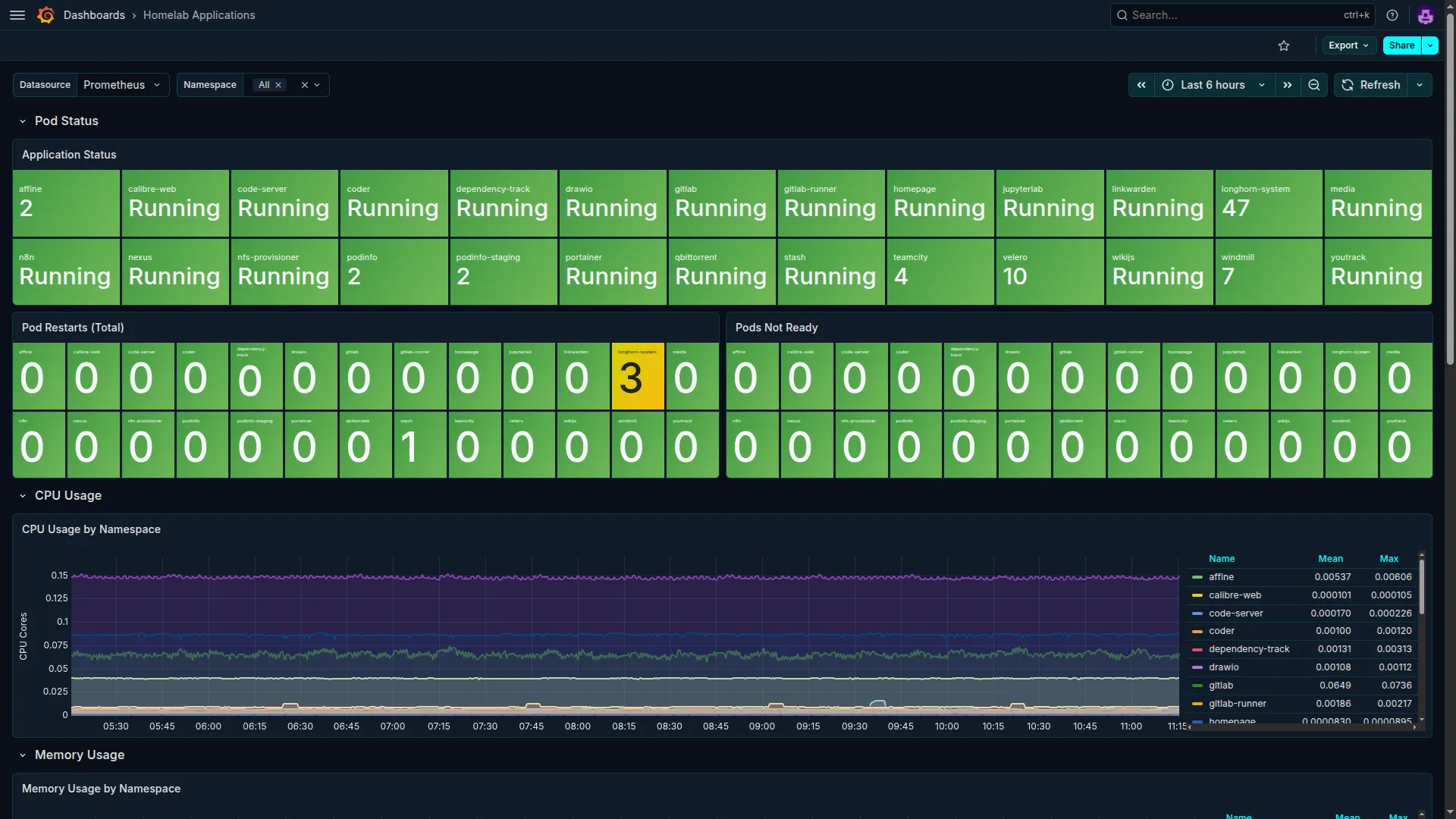 The cluster at full scale in Grafana. Every namespace with a running workload, pod counts and CPU/memory usage visible across all 20+ applications. This is what 43 sessions built.
Technical Lessons
1. The platform layer is the most important investment you’ll make
Every tutorial jumps straight to deploying an application. Almost none of them spend time on MetalLB, cert-manager, and a proper NFS provisioner, the layer that makes all subsequent application deployments smooth.
Get the platform layer right first. That means: a working LoadBalancer controller, a working ingress controller, working TLS (even self-signed is fine), working persistent storage, and a working secrets pipeline. Once all of those are solid, deploying a new application is a matter of minutes, not hours.
The platform layer is also where errors compound. A broken cert-manager configuration fails silently for weeks until you wonder why all your LAN certificates expired. A misconfigured NFS provisioner makes every new PVC a debugging exercise. Invest in getting this right before you deploy your first application.
2. GitOps is a discipline, not a feature
Flux doesn’t make you use GitOps. It makes GitOps available. The discipline, where every change is a PR, no kubectl edit, the cluster is what the repository says it is, has to come from you.
This is harder to maintain than it sounds. When something is broken at 11pm and you know a one-line kubectl patch would fix it, the GitOps discipline says: open a branch, write the fix, commit, push, let CI run, merge. That’s the right answer even when it’s slower.
The payoff comes later. When you need to roll back, you have a commit to revert. When you want to understand why something is configured a certain way, you have the PR description and the CHANGELOG entry. When you want to reproduce the environment, you have the repository. None of that exists if you’ve been patching things live.
3. Secrets management is not optional and not deferrable
“I’ll add proper secrets management later” is the most expensive sentence in infrastructure engineering. Later is when you have 15 applications all configured with hardcoded credentials, and migrating them is a multi-day project.
Set up 1Password Connect (or your secrets manager of choice) and External Secrets Operator before you deploy your first application. The ExternalSecret pattern adds maybe 20 lines per application. The cost of retrofitting it is orders of magnitude higher.
The custom text fields only rule for 1Password + ESO is worth repeating: default Login fields (username, password, url) are not addressable by the ESO property field. Create custom text fields for everything. Put this in your CLAUDE.md from day one.
4. Observability before applications, always
Deploying kube-prometheus-stack before your first application isn’t overhead. It’s the prerequisite for understanding everything that comes after. Your first application deployment will fail in some way. You need metrics and logs to understand how.
The Alertmanager inhibit_rules for InfoInhibitor is one of the most easily missed configurations in the kube-prometheus-stack defaults. Without it, future severity=info alerts will leak to your notification channel even if InfoInhibitor is firing. Add it from the start.
5. High availability is only real if you’ve tested the failover
“HA” without a tested failover is just redundant hardware. Stop PostgreSQL on the primary. Watch the VIP move. Verify the promoted standby accepts writes. Verify the applications reconnect. Restore the old primary as a standby.
Do this on purpose, in a maintenance window, before you need it. The 15-second failover only works as documented if you’ve verified each step of the keepalived to promotion to reconnect chain actually behaves as expected in your environment.
The pg_isready-only health check rule is non-negotiable. Don’t check pg_is_in_recovery() in the keepalived health script. The deadlock where the standby can never win the VRRP election is subtle, non-obvious, and will only surface during an actual failure at the worst possible time.
6. CI is the quality gate you didn’t know you needed
The GitHub Actions pipeline running on every PR caught real issues: v1beta1 API versions that would have broken on ESO upgrade, :latest image tags that would have caused non-deterministic deployments, Ansible playbooks with privilege escalation issues. Each of these would have been a debugging session if they’d reached the cluster.
The policy enforcement approach, explicit allowlists for exceptions rather than complex rules, scales better than trying to enumerate everything that’s allowed. When something legitimately needs to bypass a check, you add it to the allowlist with a comment explaining why. The history of exceptions is as valuable as the policy itself.
The Claude Code Review Action with a homelab-specific prompt is worth the setup time. Generic code review tools don’t know that external-secrets.io/v1beta1 was removed in ESO v2, or that the bpg/proxmox SSH username must be root. Domain-specific review finds domain-specific problems.
7. The /v2 bug is the containerd registry mirror gotcha you will hit
If you set up K3s containerd registry mirrors pointing to Nexus (or any other registry), and you use override_path: true, the endpoint URL in registries.yaml MUST include /v2. With override_path: true, containerd strips the /v2 prefix from requests before sending them to your endpoint. If your endpoint doesn’t include /v2, the request arrives at Nexus with the wrong path and fails silently.
# Wrong — Nexus receives the path without /v2:
endpoint: "https://nexus.10.0.0.201.nip.io/repository/docker-hub"
# Correct — /v2 is present in the endpoint, survives the strip:
endpoint: "https://nexus.10.0.0.201.nip.io/repository/docker-hub/v2"
This is not documented prominently in either the K3s or containerd documentation. It took multiple failed image pulls and careful log analysis to find. Add it to your gotchas registry immediately.
Methodology Lessons
8. Bounded scope is the most important session parameter
The sessions that went well had a clear, limited scope: “deploy Dependency-Track with external PostgreSQL and dual ingress.” The sessions that went poorly were the ones that tried to do too much: “fix all the CI issues and also add the new monitoring dashboards and also update the K3s version.”
Scope creep in AI-assisted sessions is expensive. When the AI loses track of which problem it’s solving, the output loses coherence. When the context window approaches its limit, the AI starts dropping earlier context, often exactly the context that established why a particular constraint exists.
Small sessions with clear scope consistently outperformed large sessions with ambitious scope.
9. The gotchas registry is compounding returns
Every failure documented in docs/reference/technical-gotchas.md paid dividends in every subsequent session. The pg_hba.conf is NOT replicated entry prevented that mistake from being made again. The PROXMOX_VE_* env vars silently override provider block entry saved at least two future debugging sessions.
The discipline of documenting failures immediately, before moving on, is what makes this work. The pattern is simple: something breaks, you find the root cause, you add a row to the gotchas registry. The registry grows. The failure rate in future sessions drops.
This is the closest thing to “AI memory” that actually worked reliably across session boundaries. The AI doesn’t remember previous sessions. The gotchas registry does.
10. The PR review loop is the quality gate that scales
Starting from the premise that “the AI writes code and humans review it,” rather than “the AI generates output that I apply,” changes the entire dynamic. A PR is reviewable. A PR has a description explaining what changed and why. A PR can be reverted. A PR creates an audit trail.
The human review gate isn’t overhead. It’s the accountability mechanism that makes progressive autonomy safe. Each session where the AI’s PR was reviewed, caught issues were documented, and the merge happened on human judgment built the track record that justified giving the next session more autonomy.
Never skip the review gate for security-relevant changes. The SSH username bug, the Connect/Service Account conflation, the JVM truststore issue: all were either caught in review or should have been caught sooner.
What’s Still Open
Not everything is finished. Here’s what’s still in the project plan as of the series close:
Monitoring gaps (Phase 4.7)
The monitoring stack covers the cluster, the platform services, and the major applications. What’s missing:
- Windmill dashboard: Windmill exposes Prometheus metrics; a dashboard hasn’t been built yet
- TeamCity dashboard: TeamCity metrics exist but aren’t visualized
- JupyterLab dashboard: Low traffic, but worth adding
- Loki rules: Log-based alerting for application namespaces is sparse; only cluster-level rules are configured
These are incremental. Each is a single PR, probably a few hours of work. They’re not blocking anything. They’re gaps in observability coverage that I haven’t prioritized.
CI/CD improvements (Phase 4.3)
-
1Password GitHub Action integration: The
1password/load-secrets-actionGitHub Action can inject secrets into CI jobs directly from 1Password, avoiding the need to store GitHub Actions secrets. This would close the loop on the “no secrets in CI” policy, but it’s not yet implemented. -
AI-assisted alert triage: There’s a note in the user-updates directory about pre-filtering Alertmanager alerts with AI before they reach Slack. Interesting idea, but not yet evaluated.
Future applications (Phase 5)
Kong API Gateway (Phase 5.5) is the most interesting pending evaluation. The goal is to aggregate all service APIs behind a single gateway with rate limiting, authentication plugins, and observability. The question is whether a standalone Kong deployment or the Kong Ingress Controller pattern fits better. This is a meaningful architectural decision that deserves its own session.
OWASP Dependency-Check: A CLI scanner for known vulnerabilities, complementing Dependency-Track. The decision of whether to run it as a persistent deployment or a CI/CD job hasn’t been made.
OpenVAS: A vulnerability scanner for the network layer. Low priority. It would need persistent storage and its own PostgreSQL database. On the list but not imminent.
Synology Terraform Provider: The synology-community/synology provider is at v0.6.9 and doesn’t yet support shared folder or NFS permission resources, which is what would make it useful for automating NAS configuration. Deferred until the provider matures.
Additional CI consumers for Nexus: Connecting JupyterLab’s pip.conf to the pypi proxy and Terraform’s .terraformrc to the terraform-registry proxy are small improvements that haven’t been done.
What I’d Do Differently
Set up ESO and 1Password Connect on day one. I knew I was going to use 1Password for secrets. I should have bootstrapped the Connect server and ESO before deploying the first application, not as a prerequisite I worked backward to satisfy.
Write the dual ingress pattern into a base template from session one. The pattern was obvious in retrospect: every app gets a nginx ingress for LAN and a Tailscale ingress for remote. Establishing that as a template earlier would have saved several PRs worth of retrofitting.
Trust the guided walkthrough phase longer. The temptation to have Claude do more, faster, to skip the phase where I was writing the code with guidance and move straight to reviewing Claude’s PRs, was real. Looking back, the sessions where I wrote more produced better long-term understanding. The efficiency gain from full delegation comes with a comprehension cost that shows up later when things break in unexpected ways. This was the Preface’s “writing before delegating,” and looking back, the sessions where the ratio was 70% me to 30% Claude produced code I could debug confidently six weeks later, while the 30/70 sessions produced PRs I had to re-read carefully to remember what they did.
Document failures the day they happen. Several gotchas in the registry were written from memory, days after the actual failure. The ones documented immediately are more precise and more useful.
Where This Project Sits on the Skill Curve
Dan Shapiro and Nate B Jones have articulated a five-level framework for AI coding maturity that’s worth mapping this project against honestly:
- Level 0 (Spicy Autocomplete): AI as search engine, all code is human-written
- Level 1 (Coding Intern): Offload boilerplate, review every line, move at typing speed
- Level 2 (Junior Developer): Real pair programming, reviewing all AI output
- Level 3 (Developer as Manager): Full-time code reviewer, AI writes most of the code
- Level 4 (Developer as PM): Write specifications; AI executes development
- Level 5 (Dark Factory): No human writes or reviews code; black box that turns specs into software
This project ended at Level 3. The primary output of a session was a PR that I reviewed before merging. The AI wrote the code and I evaluated it. The bottleneck was the quality of my review, not the quality of my typing.
Level 4 is the next horizon. That requires a different kind of precision, not “write me a Flux HelmRelease for Keycloak” but “here is the complete specification for the Keycloak deployment: external PostgreSQL, codecentric chart, these specific constraints, these integration points, these tests that must pass.” The AI executes. You evaluate outcomes, not diffs.
Level 5 is not the goal for infrastructure work that has real security and availability consequences. The human review gate, for every merge, every time, isn’t inefficiency. It’s the accountability mechanism that makes progressive autonomy safe.
The practical path from Level 3 to Level 4: get better at specification. Before asking Claude to implement something, write a one-paragraph spec that captures the constraints, the integration points, the failure modes to avoid, and the verification criteria. That’s the skill that scales.
What Comes Next
The platform is a foundation. What gets built on it is the interesting question.
Near-term: closing the platform gaps
The immediate roadmap: finish the monitoring coverage (Windmill, TeamCity, JupyterLab dashboards), implement Kong API Gateway as a unified service entry point, deploy OWASP Dependency-Check alongside Dependency-Track, close the remaining open verification tasks from Phase 3. These are weeks of work, not months.
Medium-term: the homelab as a development platform
The more interesting question is what the homelab becomes beyond an application host. The diagram below shows the next layer: the homelab as a full development environment, not just an app platform.
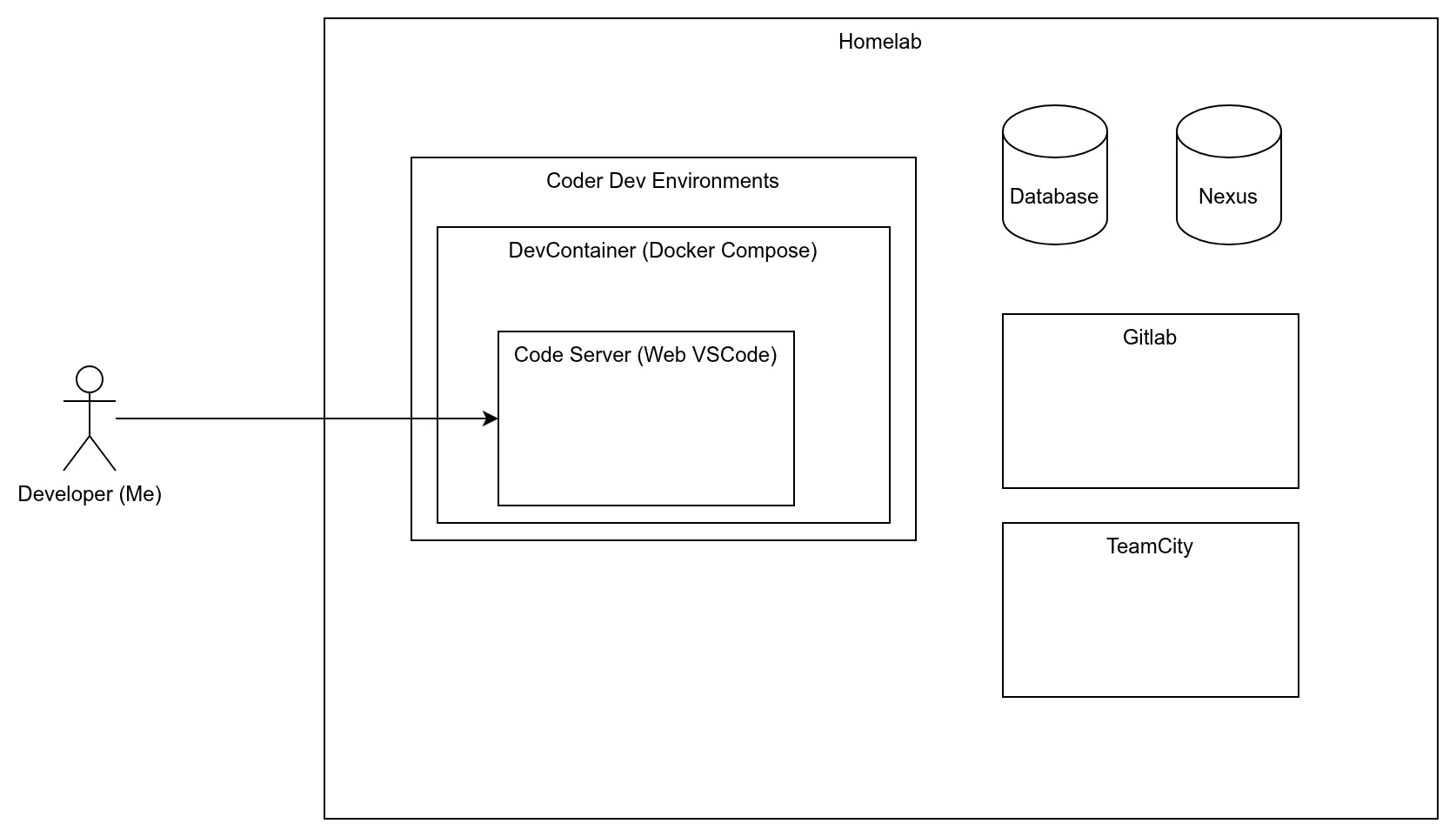
The components already in place, code-server, GitLab, Nexus, TeamCity, form a complete in-homelab development workspace. Adding Coder for workspace-as-a-service brings it to the point where a developer can open a browser, start a dev environment with the full homelab toolchain pre-configured, and work entirely within the cluster. No local environment required.
This is the vision the diagram represents: the developer connects to a Coder workspace, which spins a DevContainer with the homelab’s services, GitLab for source control, Nexus for artifacts, TeamCity for CI, code-server as the IDE, all running behind Tailscale, all authenticated via Keycloak.
Longer-term: the agent control plane
The most significant project in parallel with this series has been building a multi-agent orchestration layer, a system for coordinating Claude, Codex, Gemini, and Copilot CLI as a team rather than as interchangeable individuals.
The agent-control-plane project (a companion repository to this series) provides:
- Agent Hub CLI: a config-driven dispatcher that routes tasks to one agent or broadcasts to multiple for result comparison
- Task queue: persistent, HA-capable queue (file, SQLite, or HTTP backends) for deferred and parallel task execution
- Active-passive HA scheduling: leader election via lease files so multiple worker processes coordinate without conflicts
- Task graphs: dependency-ordered execution across a graph of tasks, each routed to the appropriate agent
- Scoring and ranking: semantic + runtime scoring to evaluate which agent produced the better output when broadcasting
The practical impact: instead of choosing between Claude and Codex for a task, you describe the task once and the system dispatches it to both, scores the results, and presents the best response. For tasks where agents have different strengths, this produces better outcomes than picking one.
This is what operating at Level 4-5 on the Nate Jones framework actually looks like in practice: you write a specification, the control plane routes it to the right agent (or multiple agents), and you evaluate outcomes rather than diffs.
The agent control plane runs alongside the homelab but isn’t deployed to it yet. Moving it in-cluster (as K8s deployments with Tailscale ingresses) is the natural next step. Combined with in-cluster MCP servers, this creates a fully self-hosted AI engineering environment: model routing, tool access, and persistent history all running on infrastructure you own.
Blog Series 2: The Agent Layer: Building Multi-Agent Infrastructure on Kubernetes will document building the agent control plane and deploying it to the homelab cluster. If Series 1 answered “how do you build production-grade infrastructure with AI assistance?”, Series 2 answers “how do you build the infrastructure that makes AI assistance itself production-grade?”
Final Note
The repository for this series is available at homelab-as-production-iac. It contains the full IaC code with all personal information replaced by generic examples. The technical-gotchas.md file in docs/reference/ is the document I’d recommend reading first.
The hardware cost was under $2,000 for five used mini PCs; the AI tooling was $100/month (Claude Max) + $20/month (Codex), roughly $120/month in subscriptions against an API-equivalent of ~$994 for the 3-week build. The real investment was time: roughly 150 hours across the project.
Everything in this series was built with Claude Code as the primary tool. The sessions, the PRs, the changelogs, and the gotchas registry are the real documentation of how that worked. The posts are the narrative on top.
The next session starts when there’s something new to build.
End of series.
This series documents a real homelab build. All IP addresses, hostnames, and personal identifiers have been replaced with generic examples. The IaC code is available in the sanitized public repository.