Homelab as Production/Part 9 of 16
Nexus — Building Your Own Software Supply Chain
Why your homelab needs a repository manager, and how to build one
Nexus — Building Your Own Software Supply Chain
The moment that made a repository manager non-optional arrived mid-afternoon: a CI run failing with a 429, FluxCD reconciliation stalled, and three K3s nodes unable to pull images, all because a single shared IP had exhausted Docker Hub’s anonymous pull quota. The error was:
Error response from daemon: toomanyrequests: You have reached your pull rate limit.
You may increase the limit by authenticating and upgrading:
https://www.docker.com/increase-rate-limit
Docker Hub’s pull rate limit is 100 unauthenticated pulls per 6 hours per IP. On a homelab with a CI/CD runner pulling images, a FluxCD reconciliation loop checking for drift, and three K3s nodes that each need to pull images on pod scheduling, you can hit that ceiling before lunch. A TeamCity build agent that pulls python:3.12-slim on every pipeline run chews through quota with mechanical efficiency.
The failure was annoying. But it pointed at a larger problem: every artifact this infrastructure needed, including container images, Linux packages, Helm charts, Python packages, npm modules, and Rust crates, was flowing in from the internet on demand. No cache. No resilience against upstream outages. No record of what was pulled and when. And no enforcement of which versions were in use.
That’s not a production pattern. That’s hoping upstream never disappears.
Nexus solved three separate problems that showed up at three different stages of the build: pull rate limits during active development, registry mirroring when K3s nodes needed consistent image pulls across all eight cluster nodes, and artifact reproducibility once the supply chain needed to be auditable. The containerd /v2 path bug is what happens when two of those solutions interact. The mirroring configuration and the proxy repository URL convention make an implicit assumption about each other that isn’t documented anywhere. Each of these gotchas went into the registry of operational knowledge, not because it was tidy practice, but because forgetting any one of them meant repeating hours of debugging. Knowledge capture is how this kind of infrastructure stays maintainable when the person who debugged it three months ago is you.
Why a Repository Manager at Homelab Scale (Problem 1: pull rate limits)
It’s tempting to write off a repository manager as enterprise overhead, a tool for organizations with compliance requirements and dedicated platform teams. But the case for running one is just as strong at homelab scale, and the cost is lower than you’d expect.
Pull rate limits are a real operational constraint. Docker Hub’s rate limits apply per source IP. A homelab cluster behind a single public IP can exhaust anonymous limits in an afternoon of active development. Nexus acts as a pull-through cache: the first pull goes to Docker Hub, subsequent pulls come from Nexus. Three K3s nodes pulling the same image on a rolling deployment become one Docker Hub request instead of three.
Reproducibility requires a local cache. Upstream registries delete tags. Image layers are garbage-collected. A build that succeeded last week against ghcr.io/someproject/someapp:1.4.2 may fail today if that tag was deleted or the manifest was mutated. Once Nexus has cached an artifact, it survives upstream deletion. This is the same reason production engineering teams run Nexus or Artifactory: not for performance, but because external dependencies are controlled by people who don’t care about your deployment schedule.
Security scanning needs a pull-through point. OWASP Dependency-Track (Post 11 in this series) can ingest SBOM data and correlate it against vulnerability databases. But to do that efficiently, it needs to know what’s in your environment. When all images flow through Nexus, you have a single catalog of what was pulled and when. Nexus’s integration surface with security tooling is a real advantage.
A single proxy for all artifact types. Container images get the most attention, but a development platform needs more: pip install for Python, cargo build for Rust, npm install for JavaScript, apt-get for VM packages, Helm chart pulls for Kubernetes. Running 13 different upstream connections in parallel is 13 points of failure. A Nexus instance handles all of them.
I’ve dealt with network outages at work. Developers become helpless. Kubernetes is on a thin slackline over a ravine and everyone prays they don’t have to deploy a fix. I didn’t want the same thing happening at home as the artifact surface grew: more documents, more applications, more things that can’t be recreated if the upstream disappears.
None of this requires a massive server. The resource footprint for a lightly-loaded Nexus instance is about 1.2Gi heap plus JVM overhead, which is manageable on a homelab cluster.
With the case clear, the first practical decision was how to deploy it, and specifically, what to do about the database.
Deploying Nexus: The H2 Decision (Problem 3: artifact reproducibility)
Sonatype Nexus Repository is the open source repository manager that covers essentially every artifact format you’d need. The paid version adds features, but the OSS version covers everything this homelab needs.
The first decision was the database backend. Nexus historically used OrientDB as its embedded datastore. As of version 3.71.0, Nexus migrated to H2 as the embedded database. The choice was whether to pair Nexus with an external PostgreSQL instance (this cluster already runs a PostgreSQL HA pair) or to use the embedded H2 database.
The answer was H2. Here’s why:
I actually trusted Claude on this one. I had a reasonable sense of the tradeoffs, but after a few prompts discussing the options, I deferred to what it thought was the right call, and the reasoning held up.
Nexus’s database is not the critical path. What Nexus stores is metadata about artifacts: repository configurations, component metadata, cached manifest pointers. The artifacts themselves live on disk (the blob store). If the H2 database were lost, Nexus can rebuild its metadata from the blob store. The database is not a single point of failure in the same way that a PostgreSQL instance for a stateful application would be.
More importantly, Nexus’s access pattern is read-heavy with low write frequency. Proxy repository workloads, which this deployment is almost entirely, go like this: cache lookup (read), optionally fetch from upstream, write metadata and blob once. H2 handles this pattern well. The additional operational complexity of an external PostgreSQL database (new database, new user, new connection string, pg_hba entries, backup coverage) wasn’t warranted for a workload where H2 is stable.
The Helm deployment is straightforward. The Sonatype-maintained chart (nexus-repository-manager) deploys Nexus with a PVC-backed data directory. The chart’s latest maintained version (64.x) supports image tag overrides to advance the Nexus application version independently.
HelmRelease excerpt:
apiVersion: helm.toolkit.fluxcd.io/v2
kind: HelmRelease
metadata:
  name: nexus
  namespace: nexus
spec:
  interval: 50m
  install:
    remediation:
      retries: 3
  chart:
    spec:
      chart: nexus-repository-manager
      version: "64.x"
      sourceRef:
        kind: HelmRepository
        name: sonatype
        namespace: nexus
      interval: 12h
  values:
    image:
      tag: "3.89.1"
    nexus:
      env:
        - name: INSTALL4J_ADD_VM_PARAMS
          value: "-Xms1200M -Xmx1200M -XX:MaxDirectMemorySize=2G -Djava.util.prefs.userRoot=/nexus-data/javaprefs"
      resources:
        requests:
          cpu: 500m
          memory: 2Gi
        limits:
          cpu: 2000m
          memory: 4Gi
    persistence:
      enabled: true
      storageClass: nfs-kubernetes
      storageSize: 50Gi
The 50Gi NFS PVC is the blob store. JVM heap is set explicitly via INSTALL4J_ADD_VM_PARAMS because the defaults are too low for sustained proxy workloads. Nexus will OOMKill itself pulling large images if you leave this at defaults. The memory limit of 4Gi gives the JVM room for the 1.2Gi heap plus off-heap direct memory, which is used heavily by Nexus’s HTTP layer.
One early gotcha: the chart version 64.x ships with an older Nexus version. Nexus versions from 3.71.0 onward require the H2 datastore migration from OrientDB, an in-place migration that runs the Nexus migrator JAR against a backup of the OrientDB data. If you start with a fresh deployment directly on 3.71.0+, you skip this migration entirely. Starting fresh on 3.89.1 with a new nexus-data PVC is the clean path.
The 13 Proxy Repositories (cross-cutting)
Proxy repositories in Nexus are pull-through caches. A request comes in for an artifact, Nexus checks its local blob store, fetches from upstream if missing, caches the result, and returns it. Subsequent requests are served locally.
The configuration script creates and idempotently updates all 13 repositories via the Nexus REST API. The script follows a GET→POST/PUT pattern: check if the repository exists, create it if not, update it if it does. Running the script twice is safe.
# Pattern: check if repo exists before creating
EXISTING=$(curl -s -u "$NEXUS_USER:$NEXUS_PASS" \
  "$NEXUS_URL/service/rest/v1/repositories" | \
  jq -r '.[] | select(.name == "docker-hub") | .name')

if [ -z "$EXISTING" ]; then
  curl -s -u "$NEXUS_USER:$NEXUS_PASS" \
    -X POST "$NEXUS_URL/service/rest/v1/repositories/docker/proxy" \
    -H "Content-Type: application/json" \
    -d '{
      "name": "docker-hub",
      "online": true,
      "proxy": {"remoteUrl": "https://registry-1.docker.io"},
      "docker": {"httpPort": 8082, "forceBasicAuth": false}
    }'
fi
The full script configures all 13 repositories; the pattern is identical for each, check, then conditionally create.
| Repository | Format | Upstream |
|---|---|---|
docker-hub |
Docker | registry-1.docker.io |
docker-ghcr |
Docker | ghcr.io |
docker-quay |
Docker | quay.io |
apt-ubuntu |
Apt | archive.ubuntu.com/ubuntu |
apt-ubuntu-security |
Apt | security.ubuntu.com/ubuntu |
npm-proxy |
npm | registry.npmjs.org |
pypi-proxy |
PyPI | pypi.org |
go-proxy |
Go | proxy.golang.org |
cargo-proxy |
Cargo | index.crates.io |
helm-stable |
Helm | charts.helm.sh/stable |
helm-bitnami |
Helm | charts.bitnami.com/bitnami |
terraform-registry |
Raw | registry.terraform.io |
gitlfs-github |
Raw | github.com |
Three separate Docker proxy repositories for Docker Hub, GitHub Container Registry, and Quay are necessary because containerd registry mirrors work at the registry hostname level. docker.io, ghcr.io, and quay.io are distinct registries that require distinct proxy configurations.
Having the repositories configured in Nexus was the easy part. Getting K3s nodes to actually route pulls through them introduced the second major problem.
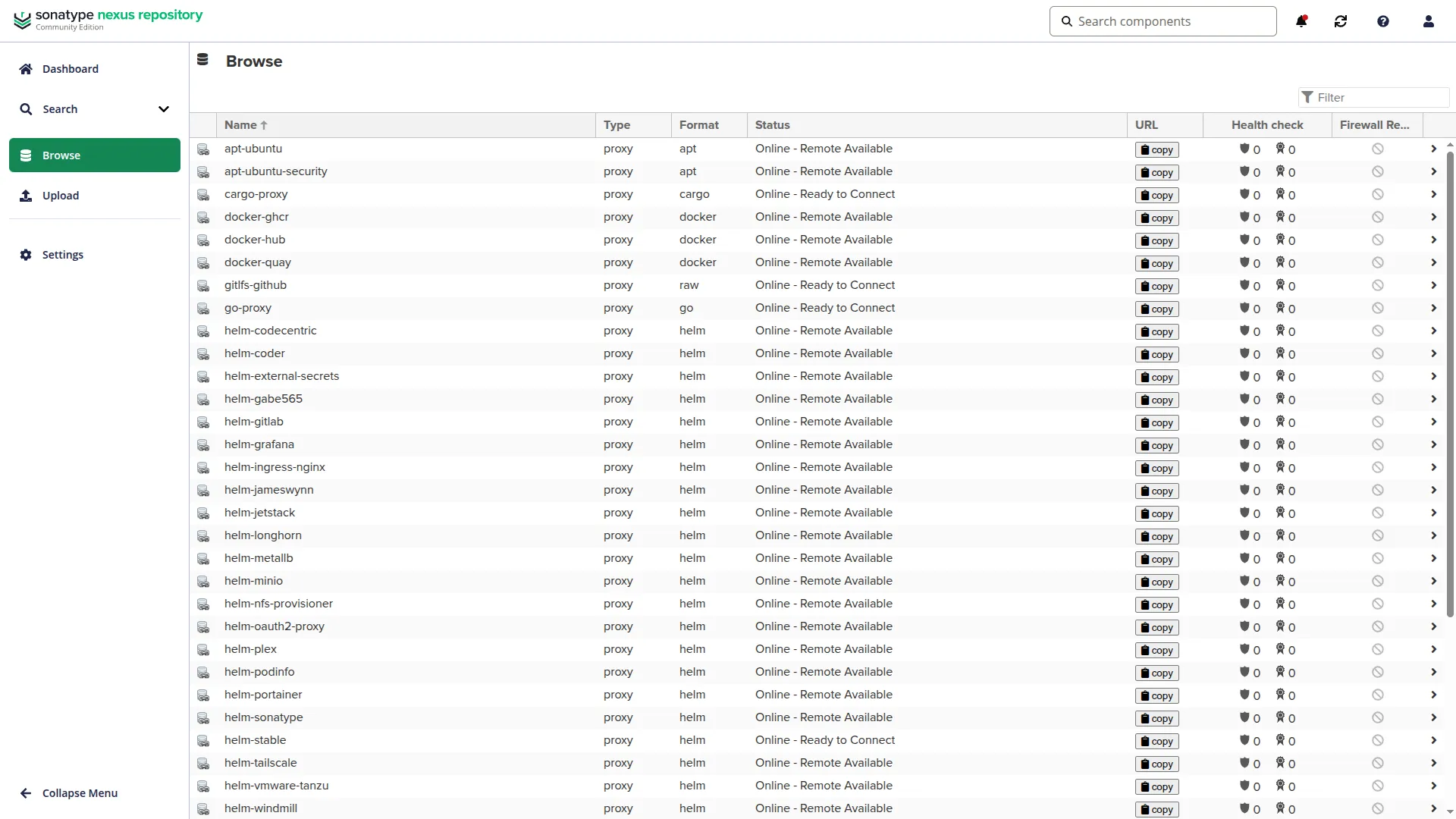 All 13 proxy repositories in Nexus, all Online and Remote Available. Every artifact type this homelab consumes flows through here: container images, packages, charts, and language-specific dependencies.
K3s Containerd Registry Mirrors: The /v2 Path Bug (Problem 2: registry mirroring)
This was the most non-obvious problem in the entire Nexus setup. It cost several hours to diagnose, and the root cause is a subtle interaction between how containerd handles path-based registry mirrors and how Nexus expects Docker V2 API requests to arrive.
This was an annoying problem, but a genuinely interesting one. I don’t think it’s commonly encountered. What made it fascinating was how non-obvious the cause was given how straightforward the fix turned out to be. Claude powered through the debugging methodically, following the HTTP requests down the stack until the discrepancy appeared.
K3s supports containerd registry mirrors via a registries.yaml file at /etc/rancher/k3s/registries.yaml. The file tells containerd: when you need to pull from docker.io, try this mirror endpoint first.
An initial attempt looked like this:
mirrors:
  docker.io:
    endpoint:
      - "http://10.0.0.202:8081/repository/docker-hub"
Every pull through this mirror returned 400 Bad Request from Nexus with the message: Not a docker request.
The debugging path: enable containerd debug logging, inspect the actual HTTP request Nexus was receiving, compare against what a direct Docker V2 client sends. What Nexus was getting was a request to /repository/docker-hub/v2/library/nginx/manifests/1.25.3, but that path doesn’t exist. The correct path in Nexus’s routing is /repository/docker-hub/v2/library/nginx/manifests/1.25.3, which is already what it looks like… except it wasn’t.
The issue is override_path. When you specify a path-based endpoint in containerd’s registry mirror configuration (as opposed to a simple host:port), containerd sets override_path = true internally. With override_path = true, containerd strips the /v2 prefix before sending requests to the mirror. The mirror endpoint is treated as the root of the Docker V2 API hierarchy, so containerd appends /v2 to the endpoint URL it has been given.
This means the endpoint http://10.0.0.202:8081/repository/docker-hub becomes the base, and containerd sends GET http://10.0.0.202:8081/repository/docker-hub/v2/.... That lands at the right Nexus path.
Except it doesn’t, because Nexus’s Docker V2 API for a proxy repository is at /repository/docker-hub/v2/..., not /repository/docker-hub//v2/.... The paths align, but only when containerd’s own /v2 append produces the correct Nexus path.
Here is the confusion: containerd strips the /v2 from requests it generates (based on Docker V2 protocol), and appends the result to your endpoint URL. So if your endpoint URL already ends in /v2, containerd generates paths like /v2/library/nginx/manifests/..., strips the leading /v2, and appends library/nginx/manifests/... to your endpoint, resulting in http://10.0.0.202:8081/repository/docker-hub/v2/library/nginx/manifests/.... That’s the correct Nexus path.
If your endpoint URL does NOT end in /v2, containerd still strips /v2 from its internally generated path and appends the remainder to your endpoint, resulting in http://10.0.0.202:8081/repository/docker-hub/library/nginx/manifests/.... Nexus has no route for that path. It returns 400 Not a docker request.
The fix is to include /v2 explicitly in the endpoint URL:
# WRONG — override_path strips /v2 and Nexus gets a bare /repository/docker-hub/ path
endpoint: "http://10.0.0.202:8081/repository/docker-hub"

# CORRECT — include /v2 so after stripping, Nexus gets /repository/docker-hub/v2
endpoint: "http://10.0.0.202:8081/repository/docker-hub/v2"
The final registries.yaml template (rendered by Ansible onto every K3s node):
# K3s containerd registry mirrors — route pulls through Nexus proxy cache
# Containerd tries the mirror first. If Nexus is unreachable, falls back to
# the upstream registry automatically (default K3s behavior).

mirrors:
  docker.io:
    endpoint:
      - "http://{{ nexus_registry_url }}/repository/docker-hub/v2"
  ghcr.io:
    endpoint:
      - "http://{{ nexus_registry_url }}/repository/docker-ghcr/v2"
  quay.io:
    endpoint:
      - "http://{{ nexus_registry_url }}/repository/docker-quay/v2"
The nexus_registry_url variable is set to 10.0.0.202:8081 in group_vars/k3s_cluster.yml, which is the MetalLB LoadBalancer IP (no scheme, just host:port), because the template adds the http:// prefix. Containerd on K3s nodes runs on the host network, not inside pods, so it uses the LAN IP directly.
The Ansible playbook deploys this template to all 8 cluster nodes (servers and agents), draining each node before restart and uncordoning afterward, rolling one node at a time. Draining with --disable-eviction bypasses PodDisruptionBudgets, which is acceptable for a homelab but worth reviewing in HA environments.
Relief. Three hours of debugging, one line in registries.yaml with /v2 appended. Impressed.
GHCR Image Tag Convention (Problem 2: registry mirroring, continued)
While debugging the AFFiNE deployment, a second tag-related problem surfaced, unrelated to containerd but equally non-obvious.
GitHub Container Registry (GHCR) publishes container images from GitHub releases. The release tag in GitHub is typically prefixed with v: v0.26.2. The natural assumption is that the Docker image tag matches the release tag.
It doesn’t.
GHCR image tags for most projects do not include the v prefix. The Docker tag is 0.26.2, not v0.26.2. Attempting to pull ghcr.io/someorg/someapp:v0.26.2 returns a manifest not found error, even if the GitHub release clearly exists with that tag name.
The reason is that Docker image tags have no semantic convention enforced by the registry. Project maintainers choose their tagging scheme independently of the GitHub release naming convention. Many projects strip the v prefix when building the Docker image, resulting in a mismatch between the GitHub release name and the Docker tag.
The fix is mechanical: always verify available tags at https://github.com/<org>/<repo>/pkgs/container/<repo> before pinning an image. Don’t assume the Docker tag matches the GitHub release tag. Nexus makes this worse, not better. Nexus will cache whatever you request, including a 404 response, so a failed pull through Nexus can produce a cached error that masks the underlying tag mismatch.
The gotchas registry entry that resulted:
GHCR image tags: GitHub release names use a
vprefix (e.g.,v0.26.2) but GHCR Docker image tags do NOT. They’re published without thev(e.g.,0.26.2). Pullingv0.26.2fromghcr.ioreturns a 404. Use the bare version number (withoutv) when referencing GHCR images. Verify available tags athttps://github.com/<org>/<repo>/pkgs/container/<repo>.
Consumer Migration (Problem 2: registry mirroring, continued)
Getting Nexus running is the easy part. Migrating every artifact consumer to route through it is where the work is.
K3s VM apt sources. The K3s virtual machines run Ubuntu 24.04. Their default apt configuration points at archive.ubuntu.com and security.ubuntu.com. Switching them to Nexus requires rewriting /etc/apt/sources.list.d/ubuntu.sources to point at the Nexus apt-ubuntu and apt-ubuntu-security proxy repositories, then running apt update to verify connectivity.
An Ansible playbook (nexus-apt-mirror.yml) handles this for all 11 nodes (K3s servers, agents, and PostgreSQL VMs) in a single run. The playbook writes a new nexus-ubuntu.sources file in deb822 format and renames the original ubuntu.sources to ubuntu.sources.disabled, which is reversible without touching the new file.
Flux HelmRepositories. The cluster’s Flux configuration references Helm chart repositories for every HelmRelease. These can be pointed at Nexus’s Helm proxy repositories by updating spec.url in each HelmRepository manifest. Caution: do this only after verifying the Nexus repositories exist. Committing the URL change before the Nexus repos are configured causes Flux to fail all dependent HelmReleases simultaneously. The cascading failure from missing repos takes down entire Kustomizations, because Flux reconciliation is atomic. Create the proxy repositories first, verify they’re accessible, then commit the URL changes.
TeamCity build agents. The build agent containers receive Nexus proxy URLs via environment variables injected into the agent Deployment:
env:
  - name: NEXUS_NPM_URL
    value: "http://10.0.0.202:8081/repository/npm-proxy/"
  - name: NEXUS_PYPI_URL
    value: "http://10.0.0.202:8081/repository/pypi-proxy/simple/"
  - name: NEXUS_GO_URL
    value: "http://10.0.0.202:8081/repository/go-proxy/"
  - name: NEXUS_CARGO_URL
    value: "http://10.0.0.202:8081/repository/cargo-proxy/"
For Cargo specifically, the agent container also receives a CARGO_HOME/config.toml via a ConfigMap mounted with subPath. Cargo reads its registry configuration from a TOML file, not an environment variable.
K3s containerd. Covered in the previous section, where the Ansible playbook deploys registries.yaml to all 8 K3s nodes.
The Dedicated MetalLB IP (Problem 2: registry mirroring — authenticated vs. unauthenticated clients)
Nexus’s nginx ingress is protected by OAuth2 Proxy for the web UI. That’s appropriate for a browser-facing management interface, but it creates a problem for every non-browser client: apt, containerd, pip, cargo. These clients can’t authenticate with Keycloak. They’ll receive a redirect to the login page instead of the artifact they requested.
The solution is to expose Nexus directly on the LAN via a second MetalLB IP, bypassing ingress-nginx entirely.
apiVersion: v1
kind: Service
metadata:
  name: nexus-lb
  namespace: nexus
  annotations:
    metallb.universe.tf/loadBalancerIPs: 10.0.0.202
spec:
  type: LoadBalancer
  loadBalancerSourceRanges:
    - 10.0.0.0/24
  selector:
    app.kubernetes.io/name: nexus-repository-manager
    app.kubernetes.io/instance: nexus
  ports:
    - name: http
      port: 8081
      targetPort: 8081
      protocol: TCP
This gives Nexus two access paths:
https://nexus.10.0.0.201.nip.io: ingress-nginx with OAuth2 Proxy protection, for the Nexus web UI (browser access)http://10.0.0.202:8081: raw LoadBalancer service, for unauthenticated artifact clients (apt, containerd, pip, cargo)
The loadBalancerSourceRanges restriction limits raw LAN IP access to the homelab subnet, which is defense in depth on a private network.
This dual-exposure pattern will recur in later posts. Any service that needs to be accessible both by humans via a browser (where authentication is appropriate) and by automated tooling (where authentication isn’t possible) needs two ingress paths.
The Proxy Architecture
graph TD
    subgraph K3s Cluster
        node1[K3s Node<br/>containerd]
        teamcity[TeamCity Agent]
        apt_client[apt on K3s VMs]
    end

    subgraph Nexus Repository Manager
        docker_hub_proxy[docker-hub proxy<br/>port 8081]
        ghcr_proxy[docker-ghcr proxy<br/>port 8081]
        npm_proxy[npm-proxy<br/>port 8081]
        apt_ubuntu[apt-ubuntu proxy<br/>port 8081]
    end

    subgraph Upstream Registries
        dockerhub[Docker Hub<br/>registry-1.docker.io]
        ghcr[GitHub Container Registry<br/>ghcr.io]
        npmjs[npmjs.com]
        ubuntu_archive[archive.ubuntu.com]
    end

    node1 -->|docker.io pull<br/>registries.yaml mirror| docker_hub_proxy
    node1 -->|ghcr.io pull<br/>registries.yaml mirror| ghcr_proxy
    teamcity -->|npm install| npm_proxy
    apt_client -->|apt-get update/install| apt_ubuntu

    docker_hub_proxy -->|cache miss| dockerhub
    ghcr_proxy -->|cache miss| ghcr
    npm_proxy -->|cache miss| npmjs
    apt_ubuntu -->|cache miss| ubuntu_archive

    docker_hub_proxy -.->|cache hit| node1
    ghcr_proxy -.->|cache hit| node1
    npm_proxy -.->|cache hit| teamcity
    apt_ubuntu -.->|cache hit| apt_client
Solid lines are outbound requests on cache miss. Dotted lines represent cached responses returned locally. On cache hit, no upstream connection is made, so no rate limit, no network dependency, no upstream availability required.
Nexus Metrics Integration (operational visibility — applies to all three)
Nexus exposes Prometheus metrics at /service/rest/metrics/prometheus. The metrics include JVM internals, HTTP request rates, repository cache hit rates, and blob store I/O, which is enough to build meaningful dashboards around proxy effectiveness and resource utilization.
The ServiceMonitor resource wires Nexus into the kube-prometheus-stack scrape configuration:
apiVersion: monitoring.coreos.com/v1
kind: ServiceMonitor
metadata:
  name: nexus
  namespace: nexus
  labels:
    app.kubernetes.io/name: nexus-repository-manager
    app.kubernetes.io/component: monitoring
spec:
  selector:
    matchLabels:
      app.kubernetes.io/name: nexus-repository-manager
      app.kubernetes.io/instance: nexus
  endpoints:
    - port: nexus-ui
      path: /service/rest/metrics/prometheus
      interval: 60s
      scrapeTimeout: 30s
      basicAuth:
        username:
          name: nexus-admin-credentials
          key: username
        password:
          name: nexus-admin-credentials
          key: password
The basicAuth block references a Kubernetes Secret (nexus-admin-credentials) that’s created by an ExternalSecret pulling the admin credentials from 1Password. The Secret key names matter: username and password must match exactly what the ExternalSecret produces. An early version had a key name mismatch (nexus-admin-password vs password) that silently prevented Prometheus from scraping. The ServiceMonitor appeared healthy but the scrape target showed authentication failures in the Prometheus targets page.
One more gotcha at the kube-prometheus-stack level: by default, Prometheus only discovers ServiceMonitors in its own namespace or those matching an explicit serviceMonitorSelector. A ServiceMonitor in the nexus namespace is silently ignored unless you configure:
prometheus:
  prometheusSpec:
    serviceMonitorNamespaceSelector: {}
The empty selector ({}) means “all namespaces.” Without this, the Nexus ServiceMonitor exists but Prometheus never finds it.
AI Collaboration Note What Claude contributed: Generated the initial idempotent bash script for the Nexus REST API configuration, including the GET→POST/PUT create-or-update pattern, dry-run flag handling, and all 13 repository configurations with their upstream URLs and format-specific parameters (Docker HTTP port, Apt distribution settings, Go GOPROXY compatibility). Where it needed correction: The initial script hardcoded the Docker proxy port as 5001 for all three Docker repositories. In practice, Nexus assigns Docker proxy repositories their own HTTP connector ports only when you need to pull by port (the legacy Docker V1 pattern). For the
/v2path-based routing approach this deployment uses, no separate Docker HTTP port is needed. The Docker repositories are accessed via path prefix on port 8081. The port configuration was removed. Prompt that worked:"Write an idempotent bash script that creates or updates these 13 Nexus proxy repositories via the REST API. Use GET to check existence, POST to create, PUT to update. Support --dry-run and single-repo filtering. The script should work with set -euo pipefail."Using a different AI tool? This type of task, structured API interaction with idempotency requirements, works well with any coding assistant. The key is to be specific about the idempotency pattern (GET-then-decide) rather than letting the tool assume create-only semantics.
Lessons
Pull-through proxy cache is production infrastructure, not a luxury. Docker Hub rate limits, upstream tag deletion, and intermittent registry outages are real operational risks. A local Nexus instance eliminates all three for cached artifacts at the cost of one additional service to maintain.
The containerd /v2 path requirement is documented nowhere obvious. The K3s documentation covers registry mirror configuration but doesn’t explain the override_path behavior that causes containerd to strip and re-append /v2. The only way to discover it is to inspect the actual HTTP requests Nexus receives and compare against the expected Docker V2 API paths. If your Nexus Docker proxy returns 400 Not a docker request, add /v2 to your mirror endpoint URL.
GHCR image tags do not match GitHub release tags. Always check the Docker registry for available tags separately from the GitHub releases page. The v prefix convention is inconsistent across projects and the Docker registry will return a 404 without explanation.
Nexus consumer migration is a two-step operation with a required gap between steps. Create and verify the proxy repositories first (via the REST API script), then commit the HelmRepository URL changes in a second PR. The gap between steps is the gap between “Nexus exists and works” and “everything depends on Nexus.” Collapsing those two steps into one PR is how you turn a smooth migration into a cluster-wide Flux failure.
Two MetalLB IPs are better than one when mixing authenticated and unauthenticated consumers. The ingress-nginx OAuth2 Proxy gate protects the Nexus web UI for browser access. A second raw LoadBalancer service on a dedicated IP bypasses authentication for artifact clients that can’t authenticate. This pattern, protected browser ingress plus raw LAN access for automated clients, is cleaner than trying to selectively bypass OAuth2 Proxy based on path or client characteristics.
Next: Post 10 — Day-2 Operations: HA, Backup, and Rolling Upgrades